

MITRE ATT&CK
See how your detection rules map across the 222 ATT&CK techniques and where coverage is missing.
MITRE ATT&CK® is a globally recognised framework of adversary tactics and techniques based on real-world observations. The MITRE ATT&CK page — titled MITRE ATT&CK® coverage — gives you a heatmap of how your detection rules map across all 222 ATT&CK techniques, so you can see at a glance where you have coverage and where gaps exist.
Each technique cell shows how many enabled and disabled rules cover it. Click any cell to drill into its sub-techniques and rules, and click a technique name's link icon to open the official MITRE ATT&CK knowledge base entry.
To open it, go to Protect › Detection Rules › MITRE ATT&CK in the sidebar. An ATT&CK tactic or technique shown in an alert's detail panel, on a rule's page or in an Ask SX answer also links here, and the page opens already searched for that ID.
How it helps your team
| Visualise your detection posture | See at a glance which ATT&CK tactics (columns) and techniques (cells) have strong rule coverage and which are blind spots — without cross-referencing spreadsheets. |
| Find your weakest tactic | The page names your weakest tactic, so you know which part of the framework needs more detection rules or log sources first. |
| Search by technique or tactic | Filter the heatmap to a technique, tactic or rule name — for example base64, powershell or lateral. |
| Link to ATT&CK intelligence | Every tactic and technique links to the official MITRE ATT&CK knowledge base, with procedure examples, mitigations and detection guidance. |
The coverage page
Summary cards sit at the top and the technique matrix below them. Each column is a tactic, and each card in a column is a technique with its enabled and disabled rule counts.
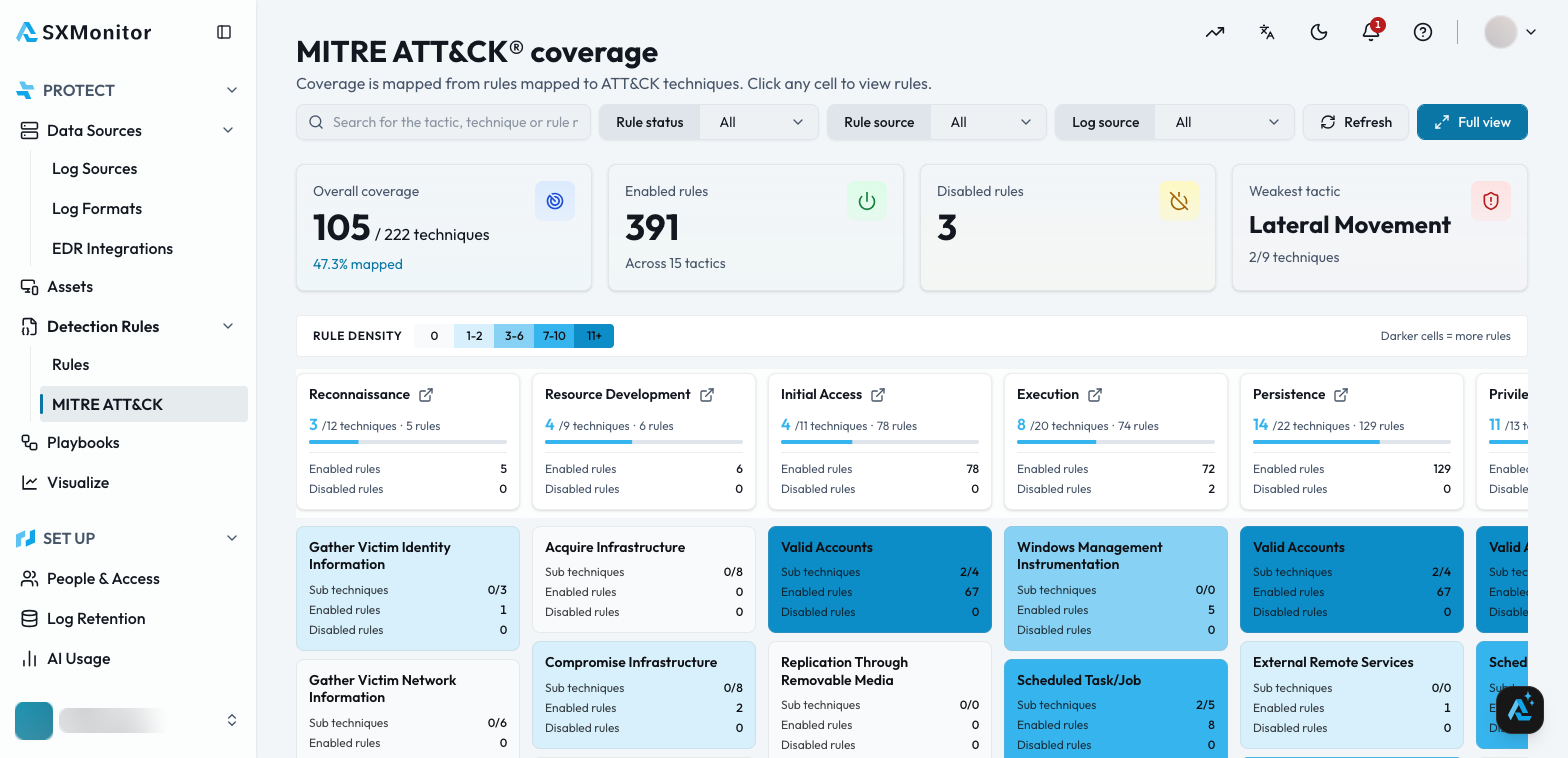
Summary cards
| Card | What it shows | How to use it |
|---|---|---|
| Overall coverage | How many of the 222 ATT&CK techniques have at least one rule mapped, and the share as % mapped. | Track it week over week as a detection KPI and share it with leadership as a measure of programme maturity. |
| Enabled rules | How many enabled rules are mapped to ATT&CK techniques, and across how many tactics. | Compare it with Disabled rules to see how much of your mapped library is actually running. |
| Disabled rules | How many mapped rules are disabled. | Each one is coverage you already have but do not use — review them in Detection Rules. |
| Weakest tactic | The tactic with the lowest share of covered techniques, for example Lateral Movement — 2/9 techniques. | Use it to prioritise. Click the card to jump to that tactic's column in the matrix. |
Reading the heatmap
| Element | What it shows |
|---|---|
| Tactic header | The tactic name, how many of its techniques are covered, its total rule count and a progress bar. The link icon opens the tactic on the MITRE ATT&CK website. |
| Enabled rules / Disabled rules (tactic level) | How many rules are enabled and disabled across all techniques of that tactic. |
| Technique cell | The technique name, its sub-technique count, and its enabled and disabled rules. Shaded cells have at least one rule; the stronger the shade, the more rules. Unshaded cells have no coverage. |
| Rule density | The colour key above the matrix: 0, 1-2, 3-6, 7-10 and 11+ rules. In the light theme it reads Darker cells = more rules, in the dark theme Brighter cells = more rules. |
| Sub techniques | Shown as X/Y (for example 2/5) — how many of the technique's sub-techniques have rules, out of the total. |
Filtering and searching
| Control | What it does | Example use |
|---|---|---|
| Search for the tactic, technique or rule name | Narrows the matrix — and the summary cards — to tactics, techniques and rules that match. | Type base64 to see the techniques whose rules detect base64-encoded payloads, or lateral to focus on Lateral Movement. |
| Rule status | All, Enabled or Disabled rules. | Pick Disabled to see where you have rules that are switched off. |
| Rule source | All, System (the built-in library) or Custom (your own rules). | Pick Custom to see what your own rules cover on their own. |
| Log source | Coverage of the rules assigned to one log source, by the name you gave it. | Pick your production source to see what is really covered there. |
| Refresh | Reloads the coverage. | After you change rules in another tab. |
| Full view | Shows the matrix full screen; Exit full view brings the page back. | Threat-modelling sessions, or presenting coverage to stakeholders. |
Drilling into a technique
Click a technique cell to open its detail panel: the sub-techniques, the rules that cover it, and links to the MITRE ATT&CK website for each entry.
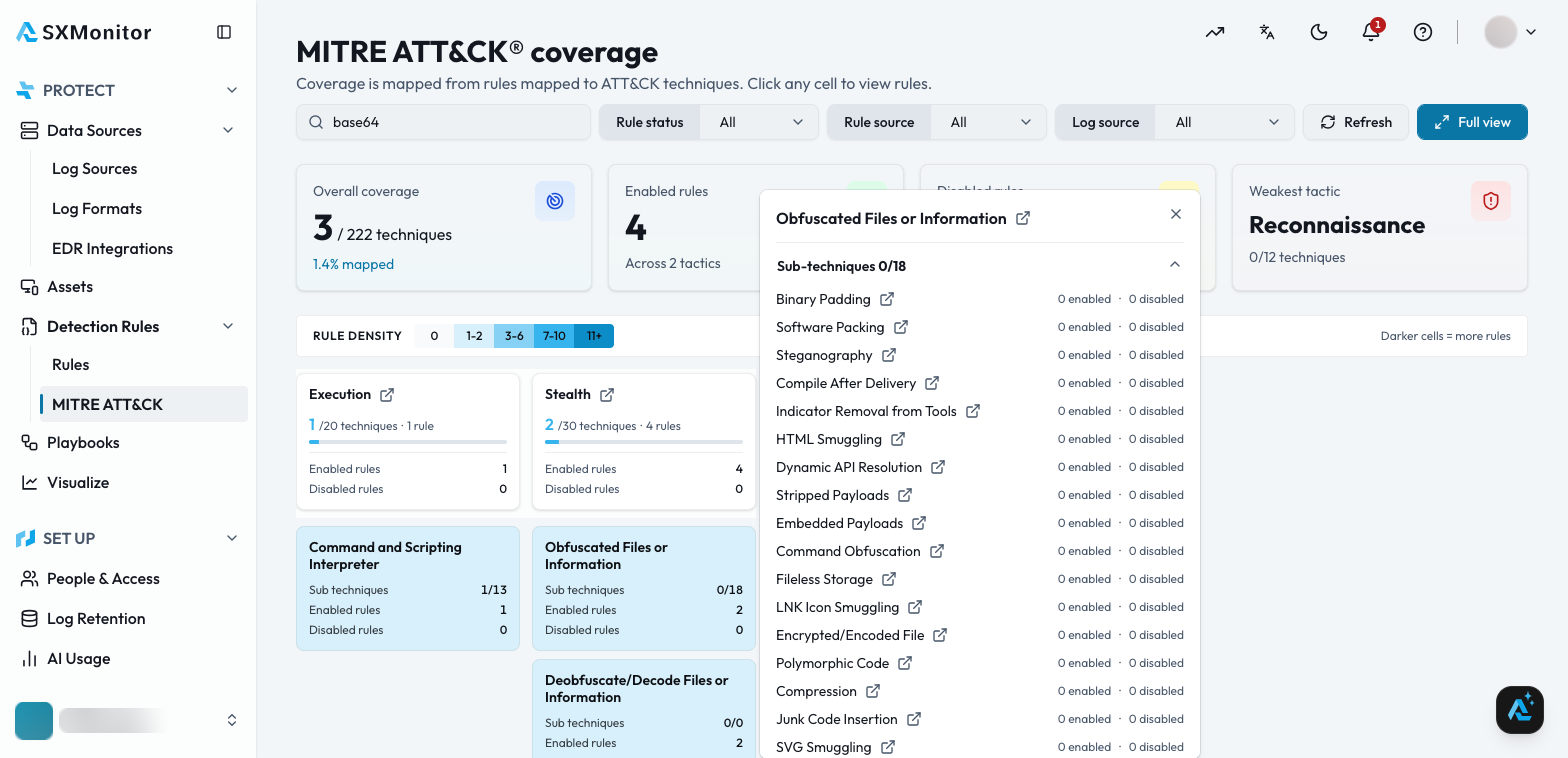
| Section | What it contains |
|---|---|
| Technique name and link | The technique name with a link icon that opens its official MITRE ATT&CK page in a new tab. |
| Sub-techniques X/Y | Every sub-technique, each with its enabled and disabled rule count and its own MITRE link. 0 enabled · 0 disabled means no rule covers it — a coverage gap. |
| Enabled rules | The enabled rules mapped to this technique. Click a rule name to open Rule Details — severity, technique, source, description, tags and the log sources the rule runs on. |
| Disabled rules | The mapped rules that are disabled. |
Following a technique to MITRE
Clicking the link icon on a tactic, technique or sub-technique opens its page on the official MITRE ATT&CK website in a new tab.
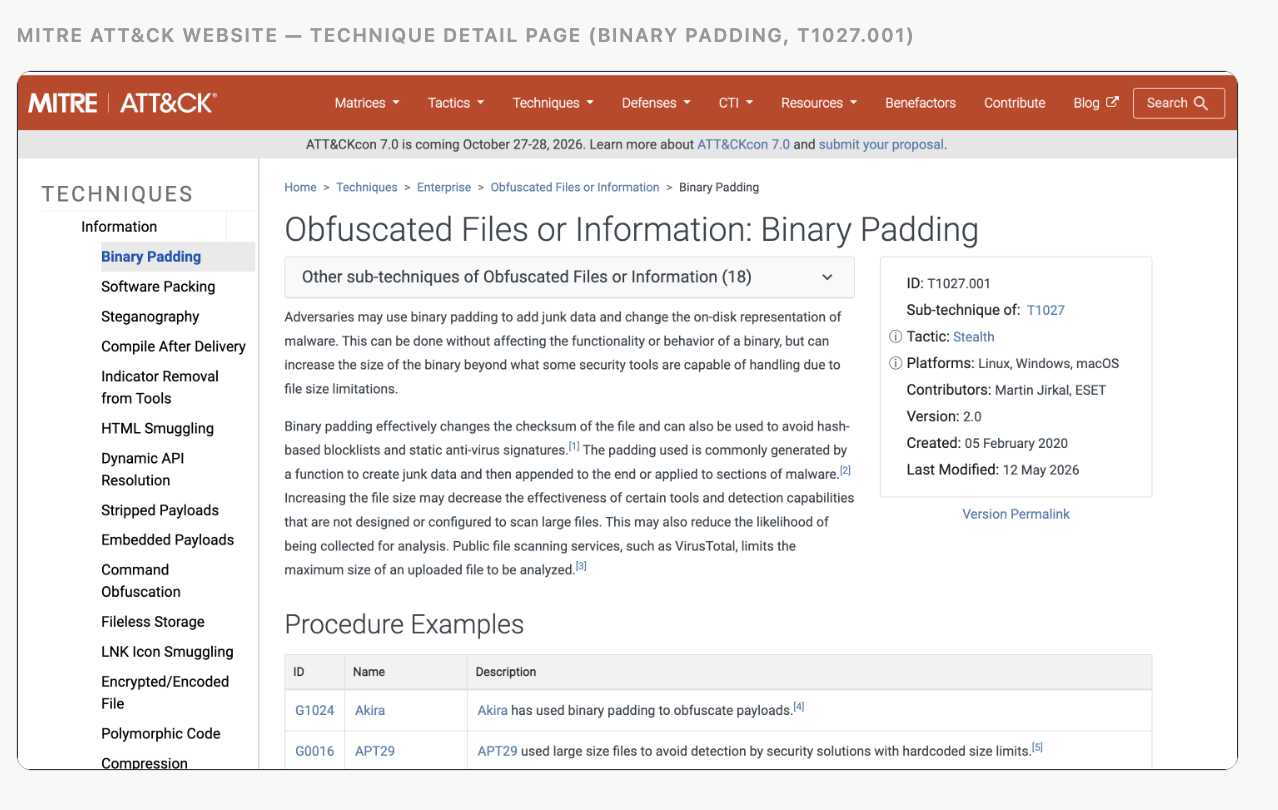
| Section | How it helps you |
|---|---|
| Technique ID & description | Understand exactly what the technique does and why adversaries use it, and check that your rules target the right behaviour. |
| Procedure Examples | Real threat actors and malware known to use the technique (for example APT29 or Akira). Helps you prioritise coverage. |
| Platforms | The operating systems and environments affected (Linux, Windows, macOS, cloud), so you can make sure you have log sources and rules for them. |
| Mitigations | MITRE's recommended defensive controls, which complement your detection rules. |
| Detection guidance | MITRE's advice on detecting the technique — useful when you write a custom rule in Detection Rules or convert a Sigma rule in Sigma Rules. |
| Sub-techniques | Variants of the parent technique. Each may need its own rule — check the detail panel in SXMonitor to see which are covered. |
Step by step: using the page
- Open MITRE ATT&CK. Go to Protect › Detection Rules › MITRE ATT&CK. The heatmap loads with your rules across all 222 techniques.
- Review the summary cards. Start with Weakest tactic — click it to jump to that column.
- Read the heatmap. Scan the tactic columns: unshaded cells have no coverage, stronger shades mean more rules. Use the Rule density key.
- Search for a technique or keyword. For example,
base64keeps only the techniques whose rules detect base64-encoded payloads. - Click a technique cell. Check which sub-techniques have rules and which show 0 enabled · 0 disabled.
- Open the MITRE ATT&CK knowledge base. Click the link icon next to a technique for procedure examples, mitigations and detection guidance.
- Act on gaps in Detection Rules. Go to Detection Rules to enable, write or import rules for the uncovered techniques, and make sure each runs on the right log sources with Assign to Log Source. Come back here to confirm the coverage went up.
Make this a regular part of your detection engineering cycle: review coverage → find gaps → enable, write or import rules → check the improvement. Over time your overall coverage climbs steadily.